


 Order Before 4:00PM MST Mon To Fri For Same Day Shipping! (Excludes Canada Post)
 Online orders ship from Canada.
HappyModel | ID: L-R6-19
HappyModel Crazy F405HD 1-2S 12A ELRS AIO
A flight controller with a built-in Serial ELRS receiver and 4-IN-1 Blheli_S 12A ESC specially developed for Digital HD FPV, which removes the analog OSD chip 7456, optimizes the PCB layout, and supports 1-2S Lipo/LiHV lithium batteries, very Suitable for Digital HD Tinywhoop/Cinewhoop/Toothpick and other small FPV drones. The flight controller uses the F405 chip, supports Betaflight/INAV firmware, has 3 sets of complete UARTs available, and integrates a BMP280 barometer and 8Mbp blackbox, which greatly enhances the playability of the flight controller.
Package Includes:
1x HappyModel Crazy F405HD 1-2S ELRS AIO
1x XT30 Lead
1x Grommet Set
1x Screw Set
Specifications:
Brand Name: Happymodel
Item Name: CrazyF405HD ELRS 1-2S AIO Flight controller
Mount size: 25.5mmx25.5mm
Weight: 4.8g without power lead wire
Firmware target: CRAZYBEEF405
Support 1-2s Lipo/LiHV battery
| Flight controller | MCU: STM32F405RGT6 (168MHZ, 1Mbyte FLASH) GYRO Sensor: BMI270 (SPI connection) Mount hole size: 25.5mm*25.5mm Power supply: 1-2S battery input (DC 2.9V-8.7V) Built-in 12A(each) Blheli_S 4in1 ESC Built-in Serial ExpressLRS 2.4GBuilt-in BMP280 Barometer Built-in 8MBp blackbox Built-in voltage meter sensor , voltage meter scale 110Built-in current meter sensor , current meter scale 470 |
| Onboard 4in1 ESC | Power supply: 1-2S LiPo/LiPo HV Current: 12A continuous peak 15A (3 seconds) Support BLHeli_S Bluejay firmware Factory firmware: Bluejay ESC V0.19Firmware target: Z-H-30 Default protocol: DSHOT300 When use 1s battery and high KV 0702/0802 motors, should set startup power to 1100/1200 |
| Onboard UART ExpressLRS 2.4GHz Receiver | Packet Rate option: 25Hz/50Hz/150Hz/250Hz/500Hz RF Frequency: 2.4GHz Antenna: enameled copper wire 31mm length Telemetry output Power: <12dBm Default firmware version: ExpressLRS V3.0.1 Firmware target: HappyModel EP1/2 2400 RX Could update firmware via ExpressLRS configurator |
IMPORTANT NOTE:
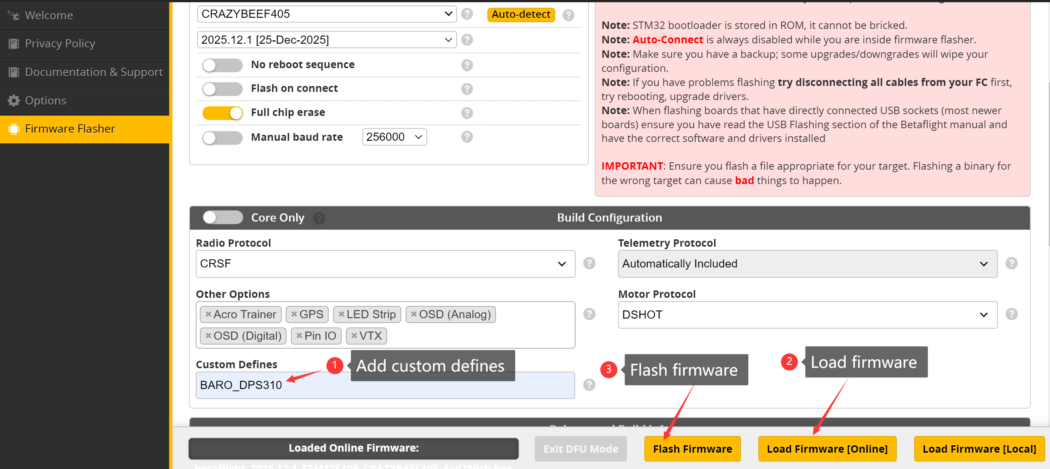
If you want to use Barometer and want to upgrade firmware,you need to add custom Defines “BARO_DPS310” from build configuration of betaflight configurator before load online firmware.
Default port settings:

If you want to use DJI Radio Controller , please change to the following settings:


Returns
Visit our return policy here.
Product Questions
Contact us via the chat bubble in the bottom right corner, and we will respond as soon as possible!
Estimate shipping
New from the Drone Dynamics Blog
Read up on the latest info in the drone world.

Osmo Nano: Resurrecting The Modular Action Camera
Action cameras are popular nowadays for all sorts of filming, from family activities to extreme sports, from diving to drone...

The DJI Flip Is the Ultimate Drone For Travelers And Creators!
Travel is about taking memories with you in breathtaking photos and videos, and DJI just made it that much easier...

Discover The Limitless Possibilities Of Unitree's Robots!
Robotics are shaping the future of technology, and Unitree Robotics is at the forefront of budget friendly accessible robots. With...
Enterprise Quotes
Need a quote for a commercial product? Get in touch with us here.
Product Suggestions
Not sure what drone is right for your needs? Contact us via email or the chat bubble with your questions.
Enterprise Demos
Purchasing a commercial drone and want a demonstration? Contact us for more information.


